|
Ditto Information
Ir para navegação
Ir para pesquisar
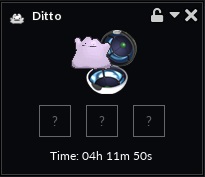
Management interface for the Shiny Ditto Memory item, which has 3 memories.
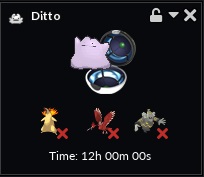
Three Pokémon saved in the memory management interface.



Introduction
Ditto is a unique Pokémon with the ability ‘’'Transform'‘’, which allows it to transform into another Pokémon, copying its appearance and moves. In addition, Ditto has a shiny version, with superior attributes, longer transform duration, and the ability to transform into shiny Pokémon.
Attributes: Ditto vs. Shiny Ditto
| Attribute | Ditto | Shiny Ditto |
|---|---|---|
| Duration of Transformation | Maximum of 6 hours | Maximum of 12 hours |
| Strength Reduction | 25% | 15% (Average value) |
| Copy Shiny Pokémon | 
|

|
How to Obtain
Ditto
It can be obtained directly from the Diamond Shop or through a  Mysterious Pokémon Egg (Box 4)
Shiny Ditto
It can also be purchased directly from the Diamond Shop. In addition to Diamonds, you must have a common Ditto +50, which will be transformed into a Shiny Ditto.
- Held items will not be lost when turning a Ditto into a Shiny Ditto.
- If Ditto is in a Premier Ball, that Poké Ball will be preserved. The same applies to other cosmetic items, such as capsules, paints, and auras.
- Shiny Ditto's power will be significantly reduced when copying Pokémon from tiers T1A, T1B, or T1C in the over time damage dealer (OTDD) category.
Transformation
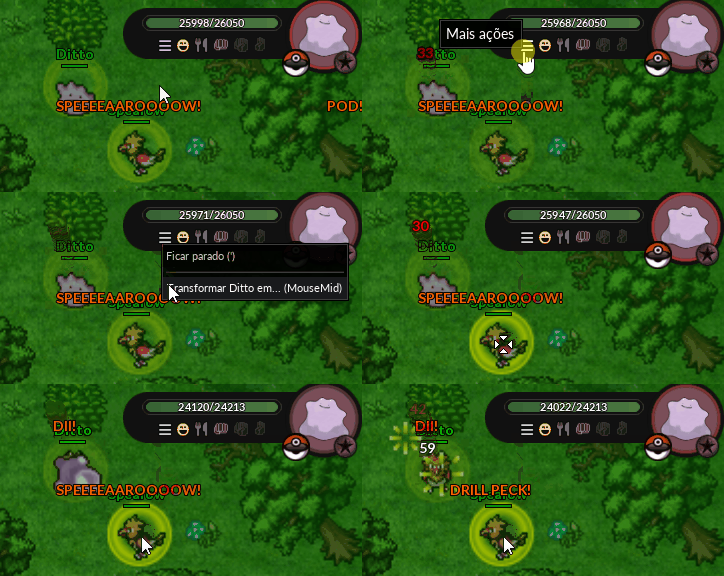
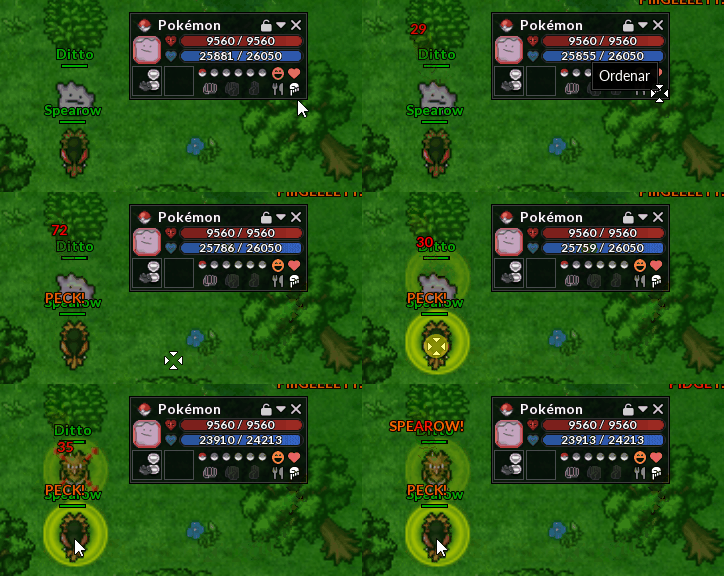
To transform Ditto or Shiny Ditto, use the "Order" button on another Pokémon. The shortcut for this command is to click the mouse scroll wheel. The player must be at or above the level of the Pokémon they wish to copy. For example, to copy a Spearow, the player must be at least level 10.
|
Commands
| Command | Description |
|---|---|
| !revert | Revert the current transformation |
| !ditto | Displays the remaining time for the transformation |
| !memory | Opens the Memory Management interface. Requires one of the Special Items |
| !memory<n> Example: !memory 1 | This command transforms Ditto or Shiny Ditto into the Pokémon saved in the specified memory slot (in the example, the first memory slot), without the need to open Memory Management interface. Requires one of the Special Items |
Special Items and Upgrades
These items can be equipped on Ditto or Shiny Ditto, allowing them to store copies of transformations, accessible without the need for the original Pokémon to be nearby.
| Item | Memories | How to Obtain | Exclusivity |
|---|---|---|---|
 Ditto Memory Ditto Memory
|
2 | NPC Duplica | Ditto |
 Shiny Ditto Memory Shiny Ditto Memory
|
3 | Redeemable at Embedded Tower | Shiny Ditto |
 Superior Shiny Ditto Memory Superior Shiny Ditto Memory
|
5 | NPC Duplica | Shiny Ditto |
 Ditto Premier Ball Ditto Premier Ball
|
- | NPC Duplica | Ditto |
| Shiny Ditto Premier Ball
|
- | NPC Duplica | Shiny Ditto |
Note: The Superior Shiny Ditto Memory can be used on  Shiny Ditto without the need to possess the Shiny Ditto Memory.
- To acquire Ditto Premier Ball or Shiny Ditto Premier Ball, you must already own the respective Pokémon. After transformation, no held items, addons, or boosts will be lost.
Memory Management
To access the memory management interface, you can type the command !memory or press the Ctrl key and right-click on your Ditto or Shiny Ditto, selecting the Ditto Memory option. A window like the one below will open.
- Use the command !memory followed by the memory number. Example: !memory 2 to access a saved transformation without opening the memory management interface.
- Changing the Ditto or Shiny Ditto's transformation during a battle counts as if the Pokémon had been defeated.
- There is no way to remove a memory item that has already been equipped, but the Pokémon can be traded normally.
- You can view the remaining transformation time, which can be renewed indefinitely.
- To delete a saved copy, simply click on the X icon.
Blocked Pokémon
| Pokémon | Ditto | Shiny Ditto |
|---|---|---|
 Big Snorlax Big Snorlax
|
|
|
 Dark Abra Dark Abra
|
|
|
 Unown Unown
|
|
|
 Pachirisu Pachirisu
|
|
|
 Smeargle Smeargle
|
|
|
 Minun and Plusle Minun and Plusle
|
|
|
 Legendary Pokémon Legendary Pokémon
|
|
|
 Pokémon Tier T1H Pokémon Tier T1H
|
|
|
 Mega Evolutions Mega Evolutions
|
|
|
 Dark Pichu Dark Pichu
|
|
|
- The copy of
 Rotom is only available in its standard form (Ghost). To access its other forms, the player must equip the corresponding transformation item to Ditto or Shiny Ditto.
 - You can only copy
 Castform from other players. All of its forms are accessible.
 - By default, new Pokémon will have their copies blocked indefinitely. There is no time limit for when they will be released for copying.
Addons
Any addon can be used on a Ditto or Shiny Ditto, as long as it is transformed into the Pokémon that will receive the addon.
- All applied addons will remain on Ditto or Shiny Ditto and can be viewed using the Look system.
- When transforming a regular Ditto into a Shiny Ditto, all addons will be kept.
- You can purchase Ditto Makeup (Addon for Ditto/Shiny Ditto) from the NPC Duplica after completing Ditto's Mystery Quest