Mystery Dungeons (EN): mudanças entre as edições
(→Energy) |
|||
| (3 revisões intermediárias por um outro usuário não estão sendo mostradas) | |||
| Linha 48: | Linha 48: | ||
* By default, each player has a limit of 100 energy points per color, and the counter will stop when you reach this limit. | * By default, each player has a limit of 100 energy points per color, and the counter will stop when you reach this limit. | ||
* The energy corresponding to Mystery Dungeon is only consumed when the challenge is successfully completed. | * The energy corresponding to Mystery Dungeon is only consumed when the challenge is successfully completed. | ||
* It is possible to reduce the regeneration time of Blue and Red Energy in Mystery Dungeons through Star Signs constellation points. | * It is possible to reduce the regeneration time of Blue and Red Energy in Mystery Dungeons through [[File:Constellation Point.png|26px|link=]] Star Signs constellation points. | ||
* It is also possible to increase the maximum capacity of Blue and Red Energy in Mystery Dungeons through Star Signs constellation points. | * It is also possible to increase the maximum capacity of Blue and Red Energy in Mystery Dungeons through [[File:Constellation Point.png|26px|link=]] Star Signs constellation points. | ||
== Limits == | == Limits == | ||
| Linha 64: | Linha 64: | ||
<center>[[Arquivo:Mystery_Dungeon_Interface_Recompensas.png|link=]]</center> | <center>[[Arquivo:Mystery_Dungeon_Interface_Recompensas.png|link=]]</center> | ||
'''Note''': Mystery Dungeons that consume Blue Energy grant a '''bonus''' to certain '''loot drops''' and '''experience''' for the first two completions each week. This information can be confirmed by hovering over the experience icon located in the dungeon rewards. | |||
This weekly bonus resets every Monday during the '''server shutdown at 7:40 AM (BRT)'''. | |||
Furthermore, when failing in a Mystery Dungeon, the player does not lose experience or bless. | |||
== Teleport and Favorites == | == Teleport and Favorites == | ||
| Linha 103: | Linha 104: | ||
<center class="hover-minimize"> | <center class="hover-minimize"> | ||
[[Arquivo:Banner_Bolinha_MD_-_Dorabelle%27s_Wrath.webp|250px|link=Mystery Dungeon - Dorabelle's Wrath]] [[Arquivo:Banner_Bolinha_MD_-_The_Magma_Insurgency.webp|250px|link=Mystery Dungeon - The Magma Insurgency]] [[Arquivo:Banner_Bolinha_MD_-_The_Celestial_Serpent.webp|250px|link=Mystery Dungeon - The Celestial Serpent]] [[Arquivo:Banner_Bolinha_MD_-_The_Darkness.webp|250px|link=Mystery Dungeon - The Darkness]] <br> [[Arquivo:Banner_Bolinha_MD_-_Below_Zero.webp|250px|link=Mystery Dungeon - Below Zero]] [[Arquivo:Banner_Bolinha_MD_-_Muchmoney_and_The_Runaway_Precious.webp|250px|link=Mystery Dungeon - Muchmoney and The Runaway Precious]] [[Arquivo:Banner_Bolinha_MD_-_Defeat_The_Darkness.webp|250px|link=Mystery Dungeon - Defeat The Darkness]] [[Arquivo:Banner_Bolinha_MD_-_Photography_Challenge.webp|250px|link=Mystery Dungeon - Photography Challenge]] <br>[[Arquivo:Banner_Bolinha_MD_-_Alpha Hisuian Typhlosion.webp|250px|link=Mystery Dungeon - Alpha Hisuian Typhlosion]] [[Arquivo:Banner_Bolinha_MD_-_Alpha Overqwil.webp|250px|link=Mystery Dungeon - Alpha Overqwil]] [[Arquivo:Banner_Bolinha_MD_-_Alpha Hisuian Arcanine.webp|250px|link=Mystery Dungeon - Alpha Hisuian Arcanine]] [[Arquivo:Banner_Bolinha_MD_-_Alpha Hisuian Electrode.webp|250px|link=Mystery Dungeon - Alpha Hisuian Electrode]] </center> | [[Arquivo:Banner_Bolinha_MD_-_Dorabelle%27s_Wrath.webp|250px|link=Mystery Dungeon - Dorabelle's Wrath]] [[Arquivo:Banner_Bolinha_MD_-_The_Magma_Insurgency.webp|250px|link=Mystery Dungeon - The Magma Insurgency]] [[Arquivo:Banner_Bolinha_MD_-_The_Celestial_Serpent.webp|250px|link=Mystery Dungeon - The Celestial Serpent]] [[Arquivo:Banner_Bolinha_MD_-_The_Darkness.webp|250px|link=Mystery Dungeon - The Darkness]] <br> [[Arquivo:Banner_Bolinha_MD_-_Below_Zero.webp|250px|link=Mystery Dungeon - Below Zero]] [[Arquivo:Banner_Bolinha_MD_-_Muchmoney_and_The_Runaway_Precious.webp|250px|link=Mystery Dungeon - Muchmoney and The Runaway Precious]] [[Arquivo:Banner_Bolinha_MD_-_Defeat_The_Darkness.webp|250px|link=Mystery Dungeon - Defeat The Darkness]] [[Arquivo:Banner_Bolinha_MD_-_Photography_Challenge.webp|250px|link=Mystery Dungeon - Photography Challenge]] <br>[[Arquivo:Banner_Bolinha_MD_-_Alpha Hisuian Typhlosion.webp|250px|link=Mystery Dungeon - Alpha Hisuian Typhlosion]] [[Arquivo:Banner_Bolinha_MD_-_Alpha Overqwil.webp|250px|link=Mystery Dungeon - Alpha Overqwil]] [[Arquivo:Banner_Bolinha_MD_-_Alpha Hisuian Arcanine.webp|250px|link=Mystery Dungeon - Alpha Hisuian Arcanine]] [[Arquivo:Banner_Bolinha_MD_-_Alpha Hisuian Electrode.webp|250px|link=Mystery Dungeon - Alpha Hisuian Electrode]] <br> [[Arquivo:Banner_Bolinha_MD_-_Alpha Kleavor.webp|250px|link=Mystery Dungeon - Alpha Kleavor]] </center> | ||
Edição atual tal como às 15h47min de 29 de março de 2026


Introduction
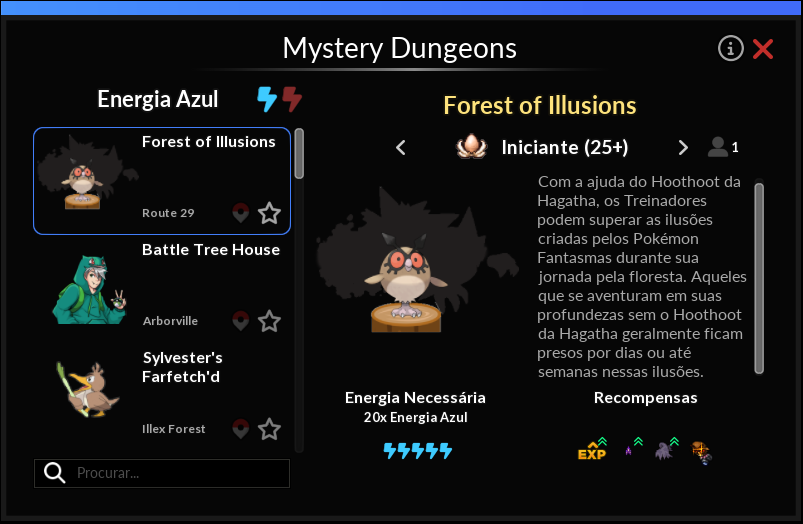
Mystery Dungeons are a way to revisit important missions already completed by the player. By gaining experience and some special items, the player can test their game mechanics, choosing the difficulty level at which they want to face a particular challenge, allowing them to battle again at different levels and helping the character’s progression.
The default shortcut to access the Mystery Dungeons interface is the Z key.
You cannot access the Mystery Dungeons interface while in the Dimensional Zones area.
Energy
Dungeons are classified into two types according to the energy required to access each challenge:  Blue and
  Red. By selecting the desired energy, you can browse the list of Mystery Dungeons for each type. Different challenges and levels consume different amounts of blue or red energy. Some challenges require the completion of quests and other requirements to appear on these lists, and it is up to the player to figure out how to enable them.
Note: Energy regeneration time may vary depending on the player's account type, with differences between VIP and FREE Accounts.
| Account Type | Blue Energy (Recharge Time) |
Red Energy (Recharge Time)
|
|---|---|---|
| VIP Account | 30 minutes | 1 hour |
| FREE Account | 2 hours | 4 hours |
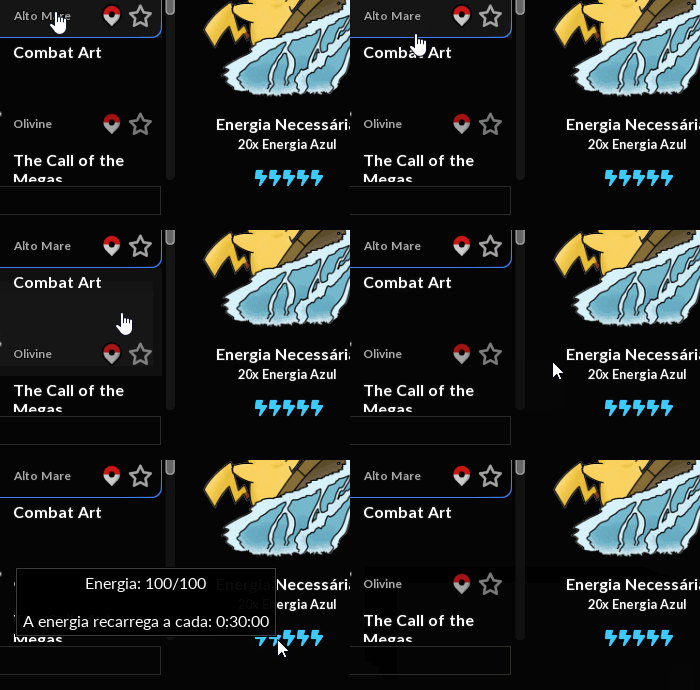
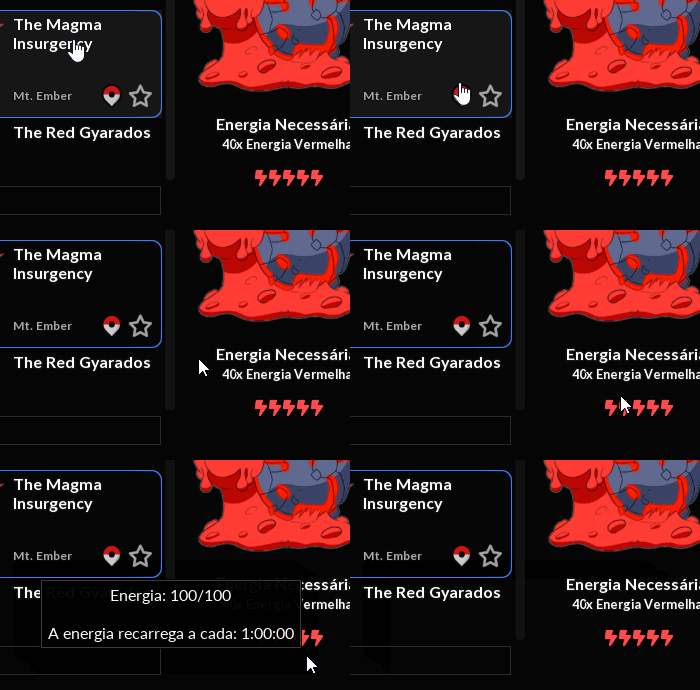
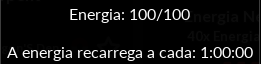
To view the amount of energy available at any given moment, simply hover your mouse cursor over the energy icons for each challenge to see the amount of the corresponding color.
Notes:
- By default, each player has a limit of 100 energy points per color, and the counter will stop when you reach this limit.
- The energy corresponding to Mystery Dungeon is only consumed when the challenge is successfully completed.
- It is possible to reduce the regeneration time of Blue and Red Energy in Mystery Dungeons through
 Star Signs constellation points.
 - It is also possible to increase the maximum capacity of Blue and Red Energy in Mystery Dungeons through Star Signs constellation points.
Limits
Mystery Dungeons that consume Blue Energy have no completion limit, as long as the player has the required energy at the time.
Mystery Dungeons that consume Red Energy, however, can only be completed once per week. After completing it, the player must wait for it to reset on Monday during the server shutdown at 7:40 AM (BRT).
Levels and Rewards
You can view the rewards, as well as the experience gained upon completing each challenge. Each level has different rewards, and it is possible that a higher-level challenge will grant less experience than a lower-level challenge, depending on the amount of energy consumed.
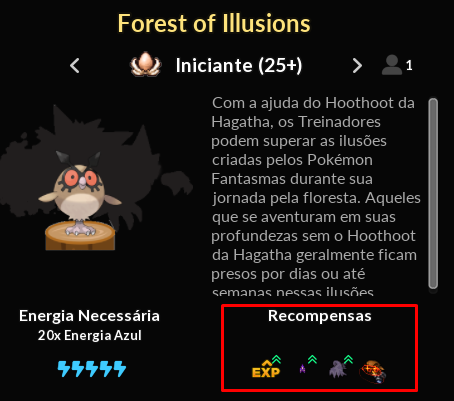
Note: Mystery Dungeons that consume Blue Energy grant a bonus to certain loot drops and experience for the first two completions each week. This information can be confirmed by hovering over the experience icon located in the dungeon rewards.
This weekly bonus resets every Monday during the server shutdown at 7:40 AM (BRT).
Furthermore, when failing in a Mystery Dungeon, the player does not lose experience or bless.
Teleport and Favorites
Once you meet the requirements to access a Mystery Dungeon, the  Teleport icon located at the bottom right of each challenge window will be enabled.
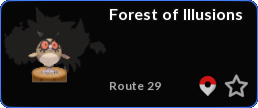
Optionally, the player can mark the challenge as a favorite, which will make it appear at the top of the list whenever the interface is opened.
Special Items
By using certain special items, the player will be able to instantly recover energy. These items are:
| Item | Effect |
|---|---|
 Condensed Blue Energy Condensed Blue Energy |
Instantly restores 20 charges of blue energy |
 Condensed Red Energy Condensed Red Energy |
Instantly recovers 40 charges of red energy |
Note: It is possible to exceed the limit of 100 energy points of a given color when using the special items listed above. However, as long as the player has more than 100 charges, they will not receive additional energy from the regeneration system. When the amount falls below 100 again, regeneration will resume as normal.
Mystery Dungeons