|
|
| Linha 4: |
Linha 4: |
|
| |
|
|
| |
|
| <br>
| | ==Intro== |
| ==Introduction== <!--T:1--> | | Would you like to have a house in your favorite city? We will teach you in this tutorial everything you need to know to have you own house and decorate it with items and objects obtained in the game. |
| Would you like to have a house in your favorite city? We will teach you in this tutorial everything you need to know to have you own house and decorate it with items/objects obtained in the game. | |
|
| |
|
| ==Requirements== <!--T:2--> | | ==Requirements== |
| *Have a [[Benefícios_VIP|Premium Account]]. | | *Have a [[Benefícios_VIP|Premium Account]]. |
| *Level 30 or higher in the character that will buy the house. | | *Level 30 or higher in the character that will buy the house. |
| | *Do not own any houses on your account on the server in question. |
|
| |
|
| ==Finding an empty house== <!--T:3--> | | <table class="seeMore"> |
| After checking the requirements you must search the global map, using Ctrl+Tab, for the symbol of a "small green house" that indicates it is empty, as you can see in the image:
| | <tr> |
| | <td class="seeMore__image">[[Arquivo:Telekinetic-compass.gif|link=]]</td> |
| | <td> '''See more: [[Benefícios VIP|Premium Account]]'''</td> |
| | </tr> |
| | </table> |
|
| |
|
| <b>OBS: The option 'Display flags and markings' must be active. Otherwise, the icons will not appear. </b> | | |
| | ==Finding an empty house== |
| | After checking the requirements, look on the World Map ('''Ctrl+Tab''') for a [[Arquivo:Casa_Ícone.png|link=]] green house icon, which indicates that the house is empty, as shown in the image below: |
| | |
| | <b>Note: The option "Show flags and marks" must be active. Otherwise, the icons will not appear. </b> |
| <center>[[Arquivo:Map-empty-houses.jpg|link=]]</center> | | <center>[[Arquivo:Map-empty-houses.jpg|link=]]</center> |
|
| |
|
| == Empty house auction == | | == Empty house auction == |
|
| |
|
| === How it works ===
| | <tabber> |
| | |-| How it works = |
|
| |
|
| When a house is empty, the auction will be started on the next check, the auction duration time is informed above the house icon in the information window. To make a bid, the player must press “Use” on the door of the empty house. | | When a house is empty, the auction will be started on the next check. The auction duration time is informed above the house icon in the information window. To make a bid, the player must press "Use" on the door of the empty house. |
|
| |
|
| A window will open with three informational fields. | | A window will open with three informational fields. |
| Linha 32: |
Linha 41: |
| '''Your maximum bid''': It is the value of your current bid in the dispute and cannot be increased until another player has covered it.<br> | | '''Your maximum bid''': It is the value of your current bid in the dispute and cannot be increased until another player has covered it.<br> |
|
| |
|
| '''Obs.''': the '''Your maximum bid''' value is not displayed to other players. It is visible only to the player who made the bid.<br> | | '''Notes:''' |
| | * You must have a VIP account, and your character must be at least level 30 to place bids. <br> |
| | * A player can only have ONE house per server; there is no limit on the number of houses per account. <br> |
| | * When you try to abandon a house, a confirmation window will appear stating that you must participate in the auction to purchase it again. <br> |
| | * When you abandon a house, a timer will show how much time is left before the auction begins. <br> |
| | * Checks are performed automatically at specific times, namely: 8:00 a.m., 11:00 a.m., 2:00 p.m., 5:00 p.m., 8:00 p.m., 11:00 p.m., 2:00 a.m., and 5:00 a.m. <br> '''Example''': If a house is vacant at 9:00 a.m., the auction will begin at the 11:00 a.m. check.<br> |
| | * The auction will last three days on older servers and one day on a new server. For houses larger than 600 SQM, the auction duration will be doubled, lasting six days on older servers and two days on a new server.<br> |
| | * You can only bid on one house at a time.<br> |
| | * If no bids are placed on the house, the auction will restart until it is sold.<br> |
| | * If a server merge occurs, the auction will end, and the player with the highest bid will win the house. After the merge, another auction will take place among the players who own the same house on the servers that were merged. |
| | |
| | |-|Bid= |
|
| |
|
| === Bid ===
| | By clicking "Use" on the house door, click on the "Bid" button and a window will open. There, the player should enter the amount they are willing to pay in the house. After the bid is placed, the money from your backpack will be removed and the '''Your maximum bid''' and '''Current bid''' fields will be updated. If a player matches their bid, the money will be sent to the Pokémon Center Deposit and an informational message will be shown. |
| | The auction ends at the same time it began; for example, if the auction for the house began at 8:00 a.m. on May 11, it will end at 8:00 a.m. on May 14. |
|
| |
|
| By clicking "Use" on the house door, click on the 'Bid' button, a window will open, where the amount that the player is willing to pay in the house must be entered. After the bid is placed, the money from your backpack will be removed and the '''Your maximum bid''' and '''Current bid''' fields will be updated. If a player matches their bid, the money will be sent to the Pokémon Center Deposit and an informational message will be sent.
| | After the auction closes, a message will be sent to the winning bidder to notify them of their victory. The house will be handed over to the player at the next check. |
|
| |
|
| <center> [[Arquivo:LeilaoBid.png|link=]] </center> | | <center> [[Arquivo:LeilaoBid.png|link=]] </center> |
|
| |
|
| '''Obs.''': | | '''Notes:''' |
| * The bid money must be in the player's inventory (cannot be inside the Vault). <br> | | * The bid money must be in the player's inventory (cannot be inside the Vault). <br> |
| * It is not possible to cancel the bid. <br> | | * It is not possible to cancel the bid. <br> |
|
| |
|
| === Finalization of the Auction === | | |-|FAQ= |
| | '''Question:''' What are the minimum requirements for participating in the auction? <br> '''Answer:''' You must have a VIP account, and the character placing bids must be at least level 30. <br> <br> |
| | |
| | '''Question:''' Can I bid on a house even if I already own one? <br> '''Answer:''' No. To bid on a house, you cannot own another one. <br> <br> |
| | |
| | '''Pergunta:''' Can I have more than one house on the same server and under the same account? <br> '''Answer:''' No. You can only purchase one house per server on the same account. <br> <br> |
| | |
| | '''Question:''' Can I bid on more than one house at the same time? <br> '''Answer:''' You can place bids on only one house at a time, meaning you cannot place bids on more than one house at the same time on the same server. <br> <br> |
| | |
| | '''Question:''' Can I cancel a bid if I change my mind? <br> '''Answer:''' Once a bid has been made, it cannot be withdrawn unless it is outbid by another player. <br> <br> |
| | |
| | '''Question:''' Where does my money go if another player outbids me? <br> '''Answer:''' If your bid is outbid, the money will be refunded to your Pokémon Center deposit. <br> <br> |
| | |
| | '''Question:''' What happens to houses that don't receive any bids during the auction? <br> '''Answer:''' If no bids are received for the house by the end of the auction, the auction will be restarted until the house is purchased by someone. <br> <br> |
| | |
| | '''Question:''' Will my highest bid for the house be public? <br> '''Answer:''' No, it will remain secret (only the player who made the bid can see it) until another player covers the bid, at which point the covered bid becomes the '''Current Bid''' plus 1. <br> <br> |
| | |
| | '''Question:''' I placed a bid and need my money back. Is there any way I can get it back so I can use it? <br> '''Answer:''' No. Once a bid is placed, the money is deducted from the player’s account and will only be refunded if their bid is outbid or if the house’s final bid is lower than the player’s maximum bid. <br> <br> |
| | |
| | '''Question:''' If I win the auction, will I have to pay the full amount I entered in the '''Your maximum bid'''? <br> '''Answer:''' No. The '''Your maximum bid''' acts as a "reserve." In other words, you'll set the maximum amount you're willing to pay for the house, and then the other players will place bids without knowing your limit. If no bid exceeds the amount you entered, you will pay the amount shown in the '''Current Bid'''; that is, the difference between the '''Current Bid''' and the amount entered in '''Your Maximum Bid''' will be subtracted, and you will receive the difference. <br> '''For example''': '''Your maximum bid''' in the auction is 15kk, but the other player dropped out with a bid of 13.5kk. So, once the auction closes, you'll pay 13.5kk for the house and get the remaining 1.5kk back. |
| | </tabber> |
| | |
| | ==Selling the house to another player== |
| | To sell your house to another player, use the [[Arquivo:CasaAzul.png|link=]] House Icon found in the upper menu of the client. <br> |
| | |
| | The person who will buy must be close to you, and for the exchange to be carried out, they must also meet the requirements mentioned above. Remembering that the owner needs to be inside the house, otherwise it will not be possible to complete. |
| | |
| | After that, an exchange with the house contract will be available between the two players, just choose normally what you want to pass on to the other player like any other exchange. |
| | <center>[[Arquivo:Interface_Selling_House.png|link=]]</center> |
| | |
| | ==Paying rent== |
| | The first obligation, after having your house, is to leave the rent money inside the Depot in the Pokémon Center (outside a bag/vault). |
| | Every month, your house will be automatically charged for rent, and if you don't leave the money at the Depot, you will lose your house. When there is no money available in your Pokémon Center, when you log in, an alert message will appear warning you about it. |
| | If you have forgotten the rent price or even the payment date, type the command '''!houseinfo''' and all the information will appear in the Default chat. |
| | <center>[[Arquivo:Rent-payment.jpg|link=]]</center> |
| | |
| | == Management interface == |
| | |
| | House management can be carried out through an interface that brings together all the functions related to managing a house. From there, you can view house information, manage invitations and permissions, review activity logs, and use other available options depending on the player’s access level. |
| | |
| | To access this interface, click the icon [[Arquivo:CasaAzul.png|20px|link=]] located in the client's top menu. You can also set up a shortcut key through the Game Settings. |
| | |
| | <center>[[Arquivo:Interface_House_Default.png|link=]]</center> |
| | |
| | When opening the interface, the player will have access to the following features: |
| | |
| | * A list of all the houses the player has access to, including their own house; |
| | * General information about the selected house, such as the owner, size, rent amount, and due date; |
| | * Teleport to the entrance of the selected house; |
| | * Option to leave the house. This feature can only be used while the player is inside the house; selecting it will take the player to the front door; |
| | * View the house's location on the minimap; |
| | * A log of actions performed with items and Pokémon inside the house, such as moving, picking up, and dropping; |
| | * History of invitations and access changes; |
| | * List of players who have access to the house; |
| | * List of permissions that can be assigned to invited players; |
| | * Option to sell the house (available only to the owner); |
| | * Option to abandon the house, causing the owner to renounce ownership of the house and triggering a new auction (available only to the owner); |
| | * Option to remove access, allowing the player to revoke their own access to the selected house (available only to guests). |
| | |
| | === How to Invite a Player === |
| | |
| | To grant access to a new player, select the '''Invite a Friend''' option and enter the name of the character you want. |
| | |
| | When sending the invitation, the owner of the house must accept the Terms of Use and Rules, confirming that they wish to grant access to the house. The invited player must also accept these terms before they can enter the house. |
| | |
| | <center> [[Arquivo:Interface-Registro de Convites.png|link=]] </center> |
| | |
| | Once the invitation has been sent, the owner can configure the guest's permissions directly through the interface, setting, for example: |
| | |
| | * Access to the house's doors; |
| | * Viewing the Item Log; |
| | * View the Invitation Log itself. |
| | |
| | The house owner can configure which doors can be opened by each available access type. In the management interface, you can individually set permissions for each access category, determining which doors players linked to that group can open. Once a player accepts the invitation to the house, the owner can assign the desired access type, automatically granting the corresponding permissions for the configured doors. |
| | |
| | <center> [[Arquivo:House_Accesses.png|link=]] </center> |
| | |
| | When accepting an invitation to the house, the player will be granted '''Guest''' access by default. The owner can change this permission directly in the house management interface. To do so, simply click the edit button located to the right of the access name, select the desired access type from the pre-configured options, and finally confirm the change to save the new permissions. |
| | |
| | === Revoke Your Own Access === |
| | |
| | A guest can revoke their own access to the house at any time. To do so, simply select the '''Revoke Access''' option and enter the name of the house owner. |
|
| |
|
| The auction ends at the same time it started, that is, if the house auction started at 8 am on May 11th, for example, it will end at 8 am on May 14th.
| |
|
| |
|
| After the auction closes, a message will be sent to the player who wins the dispute to inform them of their victory in the auction. The house will be given to the player at the next check.
| | Below is a description of the house log features, as well as instructions for performing the main actions and commands available in the system. |
|
| |
|
| === Information ===
| | <tabber> |
| | |-|Item Log= |
|
| |
|
| # You must be VIP and the character who bids must be at least level 30. <br>
| | The '''Item Log''' is a feature that allows you to track the movement of items and Pokémon within a house. Using this tool, players with permission to access the logs can view detailed information about each action, including who performed it, the date, the time, and the exact location where the movement took place. |
| # The player can only have ONE house per server, there is no limit on the number of houses in the Account. <br>
| |
| # When trying to abandon a house, a confirmation window will appear informing you that you need to participate in the auction to buy it again. <br>
| |
| # When abandoning a house, a timer will show the time left for the auction to start. <br>
| |
| # The checks are done automatically at specific times, being: 08 AM – 11 AM – 02 PM – 05 PM – 08 PM – 11 PM – 02 AM – 05 AM (BRT). <br> '''Example''': If a house is empty at 09 AM, the auction will start at 11 AM check. <br>
| |
| # You can only bid on one house at a time.<br>
| |
| # If the house does not receive a bid, the auction will restart until the house is bought.<br>
| |
| # If there is a merger on the server, the auction will be closed and whoever has the highest bid will win the house. After the merger, another auction will take place, between players who have the same house on the servers where the merger took place.
| |
|
| |
|
| === Frequently asked questions ===
| | When an item or Pokémon is moved from one location to another within the house, the system records both the starting and ending positions, allowing you to identify exactly where the action took place. |
| <span style="color:red">'''Question'''</span> '''and''' <span style="color:blue">'''Answer'''</span>
| |
|
| |
|
| *<span style="color:red">'''Q:'''</span> What are the minimum requirements to participate in the auction? <br> <span style="color:blue">'''A:'''</span> You must be a VIP Account and the character who bids must be at least level 30. <br> <br> | | Notes: |
| | * The logs remain available for up to 7 days; |
| | * After this period, the information is permanently deleted and can no longer be accessed. |
|
| |
|
| *<span style="color:red">'''Q:'''</span> Can I bid on a house even if I already own one? <br> <span style="color:blue">'''A:'''</span> No. To bid on one house, you cannot own another. <br> <br>
| | === Recorded Information === |
|
| |
|
| *<span style="color:red">'''Q:'''</span> Can I have more than one house on the same server and on the same account? <br> <span style="color:blue">'''A:'''</span> No. It is possible to purchase only one house per server in the same account. <br> <br>
| | <center> [[Arquivo:House_Item_Log.png|link=]] </center> |
|
| |
|
| *<span style="color:red">'''Q:'''</span> Is it possible to bid on more than one house at the same time? <br> <span style="color:blue">'''A:'''</span> It will be possible to bid on only one house at a time (it is not possible to bid on more than one house at the same time on the same server). <br> <br>
| | The system records various activities that take place inside the house, including: |
|
| |
|
| *<span style="color:red">'''Q:'''</span> Can I withdraw a bid if I regret it? <br> <span style="color:blue">'''A:'''</span> Once a bid has been made, it cannot be withdrawn unless it is covered by another player. <br> <br> | | * Drop and collect items and Pokémon; |
| | * Moving items and Pokémon between different locations in the house; |
| | * Interaction with functional items; |
| | * Packing and unpacking items; |
| | * Adding and removing collectible items. |
|
| |
|
| *<span style="color:red">'''Q:'''</span> Where does my money go if another player matches my bid? <br> <span style="color:blue">'''A:'''</span> If your bid is exceeded, the money will be returned to your deposit at the Pokémon Center. <br> <br>
| | In the case of Pokémon, the log displays detailed information such as: |
|
| |
|
| *<span style="color:red">'''Q:'''</span> What happens to houses that do not receive bids during the auction? <br> <span style="color:blue">'''A:'''</span> If the house does not receive any bids by the end of the auction, the auction will restart until the house is purchased by someone. <br> <br> | | * Poké Ball type; |
| | * Equipped Held Item; |
| | * Boost; |
| | * Addons; |
| | * Custom name; |
| | * TM or TR collections; |
| | * Mega Stones. |
|
| |
|
| *<span style="color:red">'''Q:'''</span> Will my maximum bid for the house be public? <br> <span style="color:blue">'''A:'''</span> No, it will be secret (only the player making the bid can see it) until another player covers the bid, and then the covered bid becomes the '''Current Bid''' plus 1. <br> <br>
| | === Search Filters === |
|
| |
|
| *<span style="color:red">'''Q:'''</span> I placed a bid and I need my money, is there any way to get it back so I can use it? <br> <span style="color:blue">'''A:'''</span> No; once the bid is made, the money is withdrawn from the player and will only be returned if their bid is exceeded or the final bid for the house is lower than the maximum bid made by the player. <br> <br>
| | To make it easier to search, records can be filtered by: |
|
| |
|
| *<span style="color:red">'''Q:'''</span> If I win the auction, will I have to pay all the amount I left in '''Your maximum bid'''? <br> <span style="color:blue">'''A:'''</span> No; '''Your maximum bid''' works as a "reserve". In other words, you will put in the maximum amount you are willing to pay for the house, and then other players will make offers without knowing your limit. If no bid exceeds the amount left by you, you will pay the amount described in the '''Current Bid'''; that is, the difference between the '''Current Bid''' amount and the amount left in '''Your Maximum Bid''' will be subtracted, and you will receive the difference in question. <br> '''For example''': '''Your maximum bid''' in the dispute is 15kk, but the other player folded with a bid of 13.5kk. So, after the auction closes, I will pay 13.5kk for the house and get back the remaining 1.5kk. | | * Date; |
| | * Type of action; |
| | * User responsible for the action; |
| | * Starting position; |
| | * Ending position. |
|
| |
|
| ==Selling the house to another player== <!--T:6-->
| | |-|Invitation Log= |
| To sell your house to another player, use the House Icon ( [[Arquivo:CasaAzul.png|link=]] ) found in the upper menu of the client. <br>
| |
|
| |
|
| The person who will buy, must be close to you and for the exchange to be carried out, they must also meet the requirements mentioned above. Remembering that the owner needs to be inside the house, otherwise it will not be possible to complete. | | The '''Invitation Log''' allows you to track all actions related to managing access to a house. Using this feature, the house owner can invite new players, configure individual permissions, and view a detailed history of all changes made. |
|
| |
|
| After that, an Exchange with the house contract will be available between the two players, just choose normally what you want to pass on to the other player like any other exchange. | | Notes: |
| <center>[[Arquivo:Selling-house.jpg|link=]]</center>
| | * The logs remain available for up to 7 days; |
| | * After this period, the information is permanently deleted and can no longer be accessed; |
| | * Only the house owner can create, delegate, and revoke access for other players. |
|
| |
|
| ==Paying rent== <!--T:7--> | | === Registered Actions === |
| The first obligation, after having your house, is to leave the rent money inside the Depot in the Pokémon Center (outside a bag/vault).
| | |
| Every month, your house will be automatically charged for rent, and if you don't leave the money at the Depot, you will lose your house. When there is no money available in your Pokémon Center, when you log in, an alert message will appear warning you about it.
| | <center> [[Arquivo:House_Invite_Log.png|link=]] </center> |
| If you have forgotten the rent price or even the payment date, type the command '''!houseinfo''' and all the information will appear in the pattern.
| | |
| <center>[[Arquivo:Rent-payment.jpg|link=]]</center> | | The system logs all actions related to access management, including: |
| | |
| | * Invitations sent and users removed; |
| | * Cancellation of invitations; |
| | * Creating and assigning permissions; |
| | * Changes to access permissions; |
| | * Actions performed by users inside the house. |
|
| |
|
| ==House commands== <!--T:8-->
| | Players with permission to view the logs will be able to use the interface to review all actions taken in the house, provided the house owner has granted the necessary permissions. |
| The owner of the house has the possibility to use several commands inside it, among them, there are commands to invite friends inside their house, to make them sub-owner, among others.
| |
| To access them, you must be inside the house and click on the icon ( [[Arquivo:CasaAzul.png|link=]] ) on the upper menu of your Client.
| |
| <center>[[Arquivo:House-commands.jpg|link=]]</center>
| |
| *'''Sub-owner:''' Set a player as Sub-owner of your house.
| |
| *'''Invite:''' Invite a player into your house.
| |
| *'''Door:''' Allow a player to be able to open and close the door in question to your house. (Remembering that to be able to use this command, you must be facing the door).
| |
| *'''Kick out:''' Kick a player out of your house
| |
| *'''Kick yourself out:''' Self-explanatory name.
| |
| *'''Sell house:''' Choose which player you would like to sell the house to.
| |
| *'''Leave house:''' Abandon the house, and thus, it will be without an owner.
| |
|
| |
|
| ===Sub-owner commands=== <!--T:9-->
| | </tabber> |
| If you put a friend as Sub-Owner of your house, they will also have access to some commands there.
| |
| <center>[[Arquivo:Sub-commands.jpg|link=]]</center>
| |
|
| |
|
| ==Additional information== <!--T:10--> | | ==Additional information== |
| *If you sell a house with the items inside, all these items will go to the Depot in the Pokémon Center. | | *If you sell a house with the items inside, all these items will go to the Depot in the Pokémon Center. |
| *The player can only have '''ONE''' house per server, there is no limit of houses in the Account. | | *The player can only have '''ONE''' house per server, there is no limit of houses in the account. |
| *If you own a house and end your VIP, you will automatically lose your house. | | *If you own a house and end your VIP, you will automatically lose your house. |
| *It is possible to teleport to houses you are invited to with the command: h"house,owner's name | | *It is possible to teleport to houses you are invited to with the command: h "house,owner's name. |
| *The command '''!cleanwall''' removes all decorations from the wall sending them to the depot of the owner of the house. | | *The command '''!cleanwall''' removes all decorations from the wall sending them to the depot of the owner of the house. |
| *If the player loses their home with a berry planted, the seed will be returned (unless the berry has already rotted). | | *If the player loses their home with a berry planted, the seed will be returned (unless the berry has already rotted). |
| Linha 129: |
Linha 234: |
| <tabber> | | <tabber> |
| |-|General information= | | |-|General information= |
| ===General information===
| |
| * Bidding is done using the '''!auctionbid X''' command (replacing X with the desired dollar amount, eg !auctionbid 1000). <br /> | | * Bidding is done using the '''!auctionbid X''' command (replacing X with the desired dollar amount, eg !auctionbid 1000). <br /> |
| * The '''!auctioninfo''' command allows you to consult useful information for the auction. <br /> | | * The '''!auctioninfo''' command allows you to consult useful information for the auction. <br /> |
| * If there is no owner of the house among the servers, there will be no auction and the house will be the for the sole owner among the servers. <br /> | | * If there is no owner of the house among the servers, there will be no auction and the house will be the for the sole owner among the servers. <br /> |
| * Casos em que os lances são iguais, a casa é dada aleatoriamente a um dos participantes. <br /> | | * In cases where bids are tied, the house is awarded at random to one of the participants. <br /> |
| * If a house is up for auction on a server at the time of the merge, the auction will close early, in which the player with the highest bid at the time will be deemed the winner. After the union, that player must dispute the house with the owner of the other server. <br /> | | * If a house is up for auction on a server at the time of the merge, the auction will close early, in which the player with the highest bid at the time will be deemed the winner. After the union, that player must dispute the house with the owner of the other server. <br /> |
| * The maximum limit per bid is 100kk. If the player wishes to bid more than 100kk, they will need to place more than one bid. <br> | | * The maximum limit per bid is 100kk. If the player wishes to bid more than 100kk, they will need to place more than one bid. <br> |
| * You don't have to wait for the other player to cover the offer to raise the bid. | | * You don't have to wait for the other player to cover the offer to raise the bid. |
| * To ensure that no player is disadvantaged during auctions when houses are unavailable, Rank S and Elixir Lab profession tables are added to the Trade Center.<br /> | | * To ensure that no player is disadvantaged during auctions when houses are unavailable, Rank S profession tables are added to the Trade Center.<br /> |
| * If the house has a Builder Kit (valid for event versions), it will be returned to the owner's deposit as an unique item. | | * If the house has a Builder Kit (valid for event versions), it will be returned to the owner's deposit as an unique item. |
| * It is possible to withdraw from the house auction after a server merge with the command '''!auctionleave'''. | | * It is possible to withdraw from the house auction after a server merge with the command '''!auctionleave'''. |



Intro
Would you like to have a house in your favorite city? We will teach you in this tutorial everything you need to know to have you own house and decorate it with items and objects obtained in the game.
Requirements
- Have a Premium Account.
- Level 30 or higher in the character that will buy the house.
- Do not own any houses on your account on the server in question.
Finding an empty house
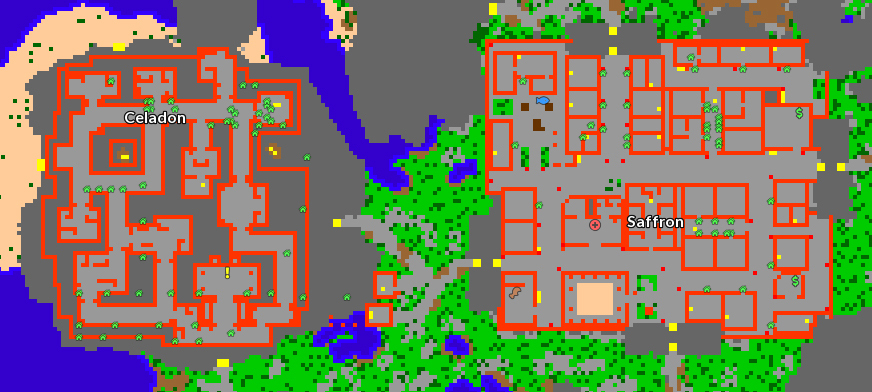
After checking the requirements, look on the World Map (Ctrl+Tab) for a  green house icon, which indicates that the house is empty, as shown in the image below:
Note: The option "Show flags and marks" must be active. Otherwise, the icons will not appear.
Empty house auction
When a house is empty, the auction will be started on the next check. The auction duration time is informed above the house icon in the information window. To make a bid, the player must press "Use" on the door of the empty house.
A window will open with three informational fields.
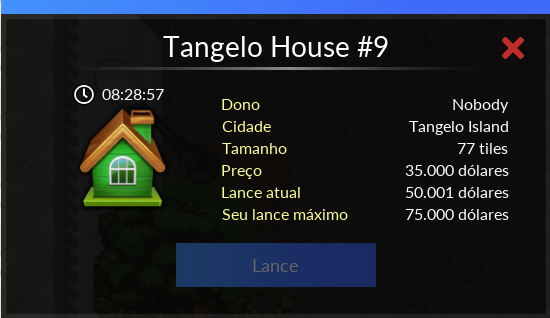
Price: It is the price of the house and also the value of the rent, which is also the minimum bid that must be made. It is not possible to place bids with values lower than the rent of the house.
Current bid: It is the value of the current bid that is winning the contest for the house.
Your maximum bid: It is the value of your current bid in the dispute and cannot be increased until another player has covered it.
Notes:
- You must have a VIP account, and your character must be at least level 30 to place bids.
- A player can only have ONE house per server; there is no limit on the number of houses per account.
- When you try to abandon a house, a confirmation window will appear stating that you must participate in the auction to purchase it again.
- When you abandon a house, a timer will show how much time is left before the auction begins.
- Checks are performed automatically at specific times, namely: 8:00 a.m., 11:00 a.m., 2:00 p.m., 5:00 p.m., 8:00 p.m., 11:00 p.m., 2:00 a.m., and 5:00 a.m.
Example: If a house is vacant at 9:00 a.m., the auction will begin at the 11:00 a.m. check.
- The auction will last three days on older servers and one day on a new server. For houses larger than 600 SQM, the auction duration will be doubled, lasting six days on older servers and two days on a new server.
- You can only bid on one house at a time.
- If no bids are placed on the house, the auction will restart until it is sold.
- If a server merge occurs, the auction will end, and the player with the highest bid will win the house. After the merge, another auction will take place among the players who own the same house on the servers that were merged.
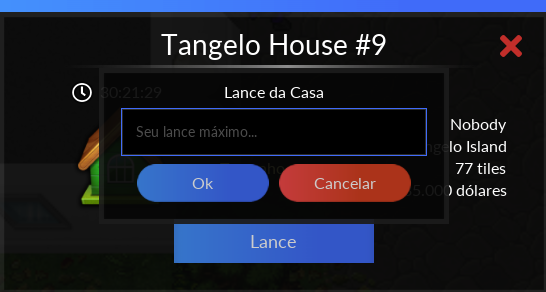
By clicking "Use" on the house door, click on the "Bid" button and a window will open. There, the player should enter the amount they are willing to pay in the house. After the bid is placed, the money from your backpack will be removed and the Your maximum bid and Current bid fields will be updated. If a player matches their bid, the money will be sent to the Pokémon Center Deposit and an informational message will be shown.
The auction ends at the same time it began; for example, if the auction for the house began at 8:00 a.m. on May 11, it will end at 8:00 a.m. on May 14.
After the auction closes, a message will be sent to the winning bidder to notify them of their victory. The house will be handed over to the player at the next check.
Notes:
- The bid money must be in the player's inventory (cannot be inside the Vault).
- It is not possible to cancel the bid.
Question: What are the minimum requirements for participating in the auction?
Answer: You must have a VIP account, and the character placing bids must be at least level 30.
Question: Can I bid on a house even if I already own one?
Answer: No. To bid on a house, you cannot own another one.
Pergunta: Can I have more than one house on the same server and under the same account?
Answer: No. You can only purchase one house per server on the same account.
Question: Can I bid on more than one house at the same time?
Answer: You can place bids on only one house at a time, meaning you cannot place bids on more than one house at the same time on the same server.
Question: Can I cancel a bid if I change my mind?
Answer: Once a bid has been made, it cannot be withdrawn unless it is outbid by another player.
Question: Where does my money go if another player outbids me?
Answer: If your bid is outbid, the money will be refunded to your Pokémon Center deposit.
Question: What happens to houses that don't receive any bids during the auction?
Answer: If no bids are received for the house by the end of the auction, the auction will be restarted until the house is purchased by someone.
Question: Will my highest bid for the house be public?
Answer: No, it will remain secret (only the player who made the bid can see it) until another player covers the bid, at which point the covered bid becomes the Current Bid plus 1.
Question: I placed a bid and need my money back. Is there any way I can get it back so I can use it?
Answer: No. Once a bid is placed, the money is deducted from the player’s account and will only be refunded if their bid is outbid or if the house’s final bid is lower than the player’s maximum bid.
Question: If I win the auction, will I have to pay the full amount I entered in the Your maximum bid?
Answer: No. The Your maximum bid acts as a "reserve." In other words, you'll set the maximum amount you're willing to pay for the house, and then the other players will place bids without knowing your limit. If no bid exceeds the amount you entered, you will pay the amount shown in the Current Bid; that is, the difference between the Current Bid and the amount entered in Your Maximum Bid will be subtracted, and you will receive the difference.
For example: Your maximum bid in the auction is 15kk, but the other player dropped out with a bid of 13.5kk. So, once the auction closes, you'll pay 13.5kk for the house and get the remaining 1.5kk back.
Selling the house to another player
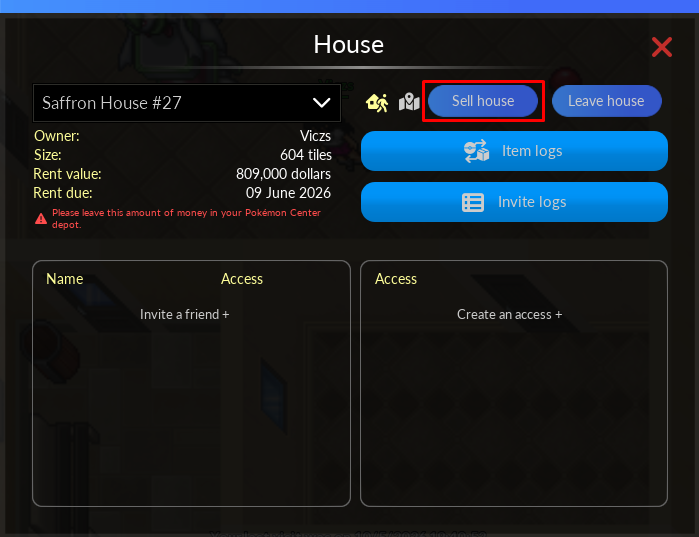
To sell your house to another player, use the  House Icon found in the upper menu of the client.
The person who will buy must be close to you, and for the exchange to be carried out, they must also meet the requirements mentioned above. Remembering that the owner needs to be inside the house, otherwise it will not be possible to complete.
After that, an exchange with the house contract will be available between the two players, just choose normally what you want to pass on to the other player like any other exchange.
Paying rent
The first obligation, after having your house, is to leave the rent money inside the Depot in the Pokémon Center (outside a bag/vault).
Every month, your house will be automatically charged for rent, and if you don't leave the money at the Depot, you will lose your house. When there is no money available in your Pokémon Center, when you log in, an alert message will appear warning you about it.
If you have forgotten the rent price or even the payment date, type the command !houseinfo and all the information will appear in the Default chat.
Management interface
House management can be carried out through an interface that brings together all the functions related to managing a house. From there, you can view house information, manage invitations and permissions, review activity logs, and use other available options depending on the player’s access level.
To access this interface, click the icon  located in the client's top menu. You can also set up a shortcut key through the Game Settings.
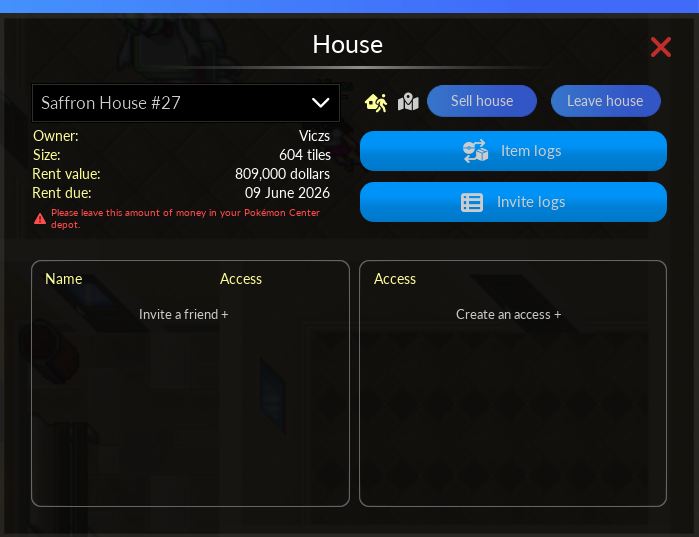
When opening the interface, the player will have access to the following features:
- A list of all the houses the player has access to, including their own house;
- General information about the selected house, such as the owner, size, rent amount, and due date;
- Teleport to the entrance of the selected house;
- Option to leave the house. This feature can only be used while the player is inside the house; selecting it will take the player to the front door;
- View the house's location on the minimap;
- A log of actions performed with items and Pokémon inside the house, such as moving, picking up, and dropping;
- History of invitations and access changes;
- List of players who have access to the house;
- List of permissions that can be assigned to invited players;
- Option to sell the house (available only to the owner);
- Option to abandon the house, causing the owner to renounce ownership of the house and triggering a new auction (available only to the owner);
- Option to remove access, allowing the player to revoke their own access to the selected house (available only to guests).
How to Invite a Player
To grant access to a new player, select the Invite a Friend option and enter the name of the character you want.
When sending the invitation, the owner of the house must accept the Terms of Use and Rules, confirming that they wish to grant access to the house. The invited player must also accept these terms before they can enter the house.
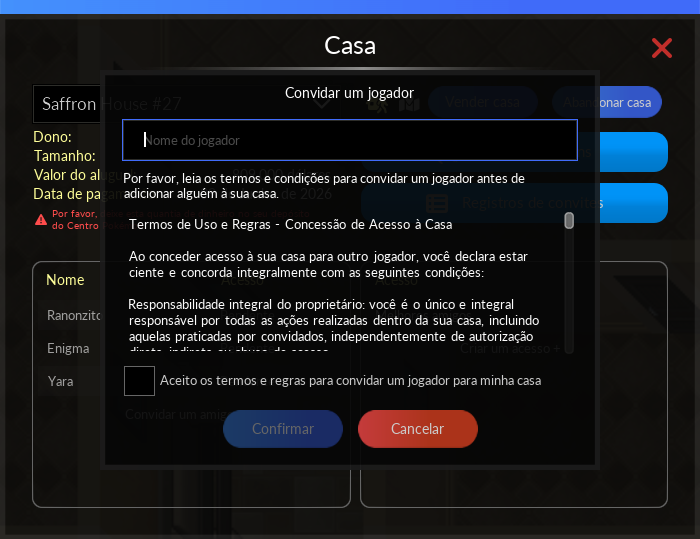
Once the invitation has been sent, the owner can configure the guest's permissions directly through the interface, setting, for example:
- Access to the house's doors;
- Viewing the Item Log;
- View the Invitation Log itself.
The house owner can configure which doors can be opened by each available access type. In the management interface, you can individually set permissions for each access category, determining which doors players linked to that group can open. Once a player accepts the invitation to the house, the owner can assign the desired access type, automatically granting the corresponding permissions for the configured doors.
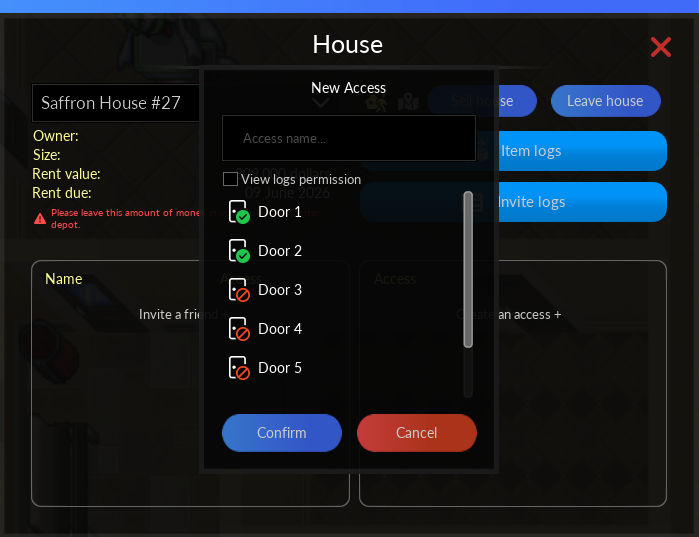
When accepting an invitation to the house, the player will be granted Guest access by default. The owner can change this permission directly in the house management interface. To do so, simply click the edit button located to the right of the access name, select the desired access type from the pre-configured options, and finally confirm the change to save the new permissions.
Revoke Your Own Access
A guest can revoke their own access to the house at any time. To do so, simply select the Revoke Access option and enter the name of the house owner.
Below is a description of the house log features, as well as instructions for performing the main actions and commands available in the system.
The Item Log is a feature that allows you to track the movement of items and Pokémon within a house. Using this tool, players with permission to access the logs can view detailed information about each action, including who performed it, the date, the time, and the exact location where the movement took place.
When an item or Pokémon is moved from one location to another within the house, the system records both the starting and ending positions, allowing you to identify exactly where the action took place.
Notes:
- The logs remain available for up to 7 days;
- After this period, the information is permanently deleted and can no longer be accessed.
Recorded Information
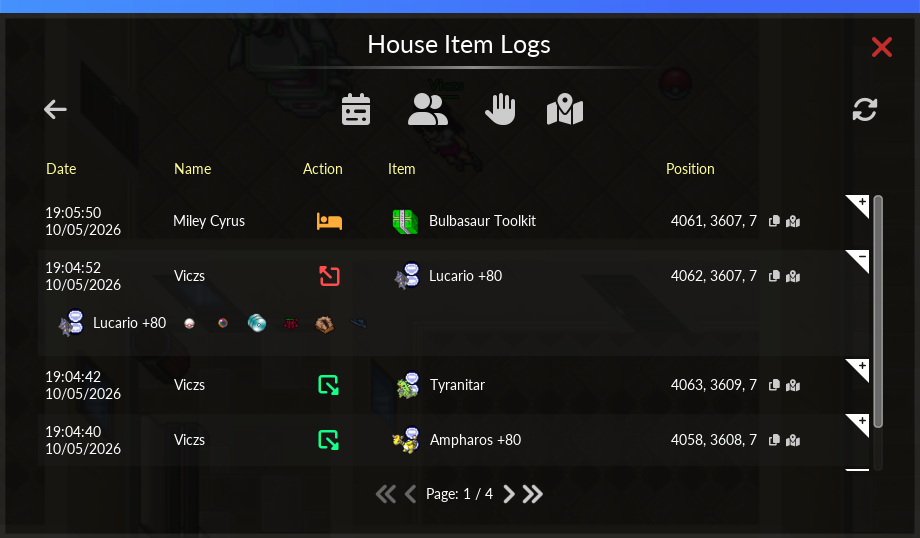
The system records various activities that take place inside the house, including:
- Drop and collect items and Pokémon;
- Moving items and Pokémon between different locations in the house;
- Interaction with functional items;
- Packing and unpacking items;
- Adding and removing collectible items.
In the case of Pokémon, the log displays detailed information such as:
- Poké Ball type;
- Equipped Held Item;
- Boost;
- Addons;
- Custom name;
- TM or TR collections;
- Mega Stones.
Search Filters
To make it easier to search, records can be filtered by:
- Date;
- Type of action;
- User responsible for the action;
- Starting position;
- Ending position.
The Invitation Log allows you to track all actions related to managing access to a house. Using this feature, the house owner can invite new players, configure individual permissions, and view a detailed history of all changes made.
Notes:
- The logs remain available for up to 7 days;
- After this period, the information is permanently deleted and can no longer be accessed;
- Only the house owner can create, delegate, and revoke access for other players.
Registered Actions
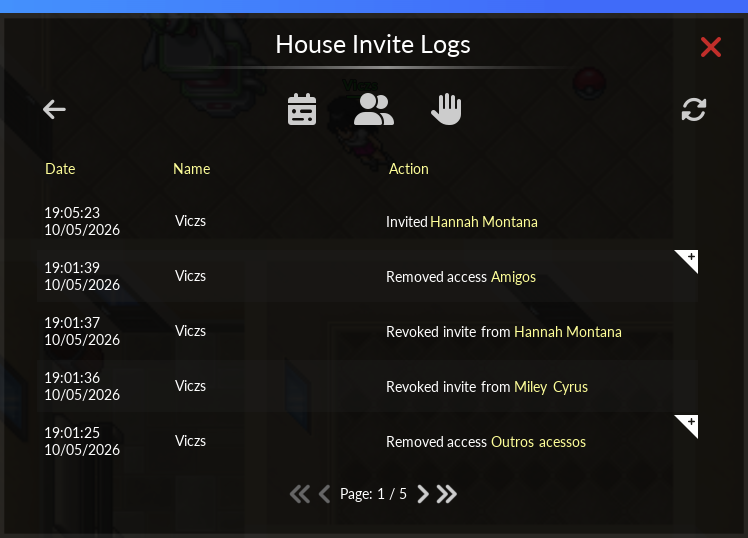
The system logs all actions related to access management, including:
- Invitations sent and users removed;
- Cancellation of invitations;
- Creating and assigning permissions;
- Changes to access permissions;
- Actions performed by users inside the house.
Players with permission to view the logs will be able to use the interface to review all actions taken in the house, provided the house owner has granted the necessary permissions.
Additional information
- If you sell a house with the items inside, all these items will go to the Depot in the Pokémon Center.
- The player can only have ONE house per server, there is no limit of houses in the account.
- If you own a house and end your VIP, you will automatically lose your house.
- It is possible to teleport to houses you are invited to with the command: h "house,owner's name.
- The command !cleanwall removes all decorations from the wall sending them to the depot of the owner of the house.
- If the player loses their home with a berry planted, the seed will be returned (unless the berry has already rotted).
Auction following server merger
After the merger of the servers is complete, an auction will be held among all owners of the same house of two or more servers for 7 days, which may be anticipated if the players reach an agreement. The winner will keep the house; the other player will have their money returned and will also keep the money bet by the winner.
Note: The auction between two or more players who own the same house after the merger of servers is not in the same format as the auction for a house that was without an owner.
- Bidding is done using the !auctionbid X command (replacing X with the desired dollar amount, eg !auctionbid 1000).
- The !auctioninfo command allows you to consult useful information for the auction.
- If there is no owner of the house among the servers, there will be no auction and the house will be the for the sole owner among the servers.
- In cases where bids are tied, the house is awarded at random to one of the participants.
- If a house is up for auction on a server at the time of the merge, the auction will close early, in which the player with the highest bid at the time will be deemed the winner. After the union, that player must dispute the house with the owner of the other server.
- The maximum limit per bid is 100kk. If the player wishes to bid more than 100kk, they will need to place more than one bid.
- You don't have to wait for the other player to cover the offer to raise the bid.
- To ensure that no player is disadvantaged during auctions when houses are unavailable, Rank S profession tables are added to the Trade Center.
- If the house has a Builder Kit (valid for event versions), it will be returned to the owner's deposit as an unique item.
- It is possible to withdraw from the house auction after a server merge with the command !auctionleave.
- If there are three or more players in the auction, the highest bidder wins. The bids of the players who lost the auction are returned to each of them, and they then divide the winning player's bid equally among themselves.
- When the auction time ends, the system will determine the winner within up to 3 hours. After that, the house will be delivered to the winner.
Early Closure
Currently, there is a feature that allows players to end the house auction early. The player must use the command !auctionleave. After using the command, a message will be displayed informing them of what will happen. If the player agrees with the information presented, they must use the command again to instantly leave the auction.
When using !auctionleave, if the player is in an auction with 3 or more people, they will withdraw their bid from the auction, receive their money back, and leave the competition. This way, the auction will continue normally among the remaining players. If there are only 2 people in the auction, it will be closed and the player who used the command to leave will be the loser, taking the money accumulated from the two bids, while the other player will keep the house.
- To confirm leaving the auction, the command must be used twice.
- If there is any change in the offer value between the first and second use of the command, it is restarted. If so, you need to use the command twice again.
- If the player uses the command and leaves the game, it will be restarted. So, after entering the game again, you need to use the command twice.
