Connection Issues: mudanças entre as edições
Sem resumo de edição |
Sem resumo de edição |
||
| (24 revisões intermediárias por 2 usuários não estão sendo mostradas) | |||
| Linha 1: | Linha 1: | ||
<center> [[Arquivo:Banner_Connection_Issues.png|link=]] </center> <br> | |||
[[Arquivo:PT-BR.png|link=Problemas de conexão]] [[Arquivo:ES.png|link=Problemas de Conexión]] | |||
Hello, Trainer! | Hello, Trainer! | ||
| Linha 35: | Linha 39: | ||
For a more stable and faster internet connection, consider switching from Wi-Fi to a wired Ethernet connection, potentially resolving your connectivity issues. | For a more stable and faster internet connection, consider switching from Wi-Fi to a wired Ethernet connection, potentially resolving your connectivity issues. | ||
'''Note:''' If your computer doesn't have an Ethernet port, you may need an adapter or a USB-to-Ethernet converter. | |||
| Linha 45: | Linha 51: | ||
'''2.''' Input the following commands sequentially, hitting '''Enter''' after each: | '''2.''' Input the following commands sequentially, hitting '''Enter''' after each: | ||
* | * ipconfig /flushdns | ||
* ipconfig /release | * ipconfig /release | ||
* ipconfig /renew | * ipconfig /renew | ||
* ipconfig /registerdns | * ipconfig /registerdns | ||
* netsh winsock reset | |||
* netsh int ip reset | |||
* netsh int ipv4 reset reset.log | |||
* NBTSTAT -R | |||
* NBTSTAT -RR | |||
'''Note:''' The "ipconfig /release" command will temporarily disconnect you from your network. Don't worry; your connection will be restored with the next command. | '''Note:''' The "ipconfig /release" command will temporarily disconnect you from your network. Don't worry; your connection will be restored with the next command. | ||
| Linha 134: | Linha 142: | ||
'''1.''' | '''1.''' Close the Launcher. | ||
'''2.''' Go to the PokeXGames folder and look for '''assets''', then '''things'''. | |||
''' | '''Heads-up:''' Right-click on the game app and choose '''Open file location'''. You might have to do this twice to get back to the main folder. | ||
'''3.''' Delete any outdated '''things.spr''' files. | |||
''' | '''4.''' Open the Launcher and hang tight while it downloads the updated files. | ||
Edição atual tal como às 13h51min de 4 de julho de 2024



Hello, Trainer!
If you're dealing with connection issues (errors 10054, 10060, 10061, 11001, 444, and others), here's your troubleshooting guide.
Repair the Game Launcher
The first step you can take is to run an automatic repair tool specifically designed for PokeXGames. To do this, search your computer for Repair PokeXGames and execute the automated repair process.
Reboot Your Internet Router
You'd be surprised how many issues can be resolved with a simple router reboot. Turn off your router, wait for at least 60 seconds, and turn it back on.
Refresh Your Network Adapter
Sometimes, your network adapter might be the culprit. Here's a quick way to reset it:
1. Close the PokeXGames Client.
2. Press Windows Key + R to open the Run dialog.
3. Type ncpa.cpl and hit Enter.
4. Right-click on your active network connection, then choose Disable.
5. Wait for 10 seconds.
6. Right-click again and select Enable.
Use an Ethernet Cable
For a more stable and faster internet connection, consider switching from Wi-Fi to a wired Ethernet connection, potentially resolving your connectivity issues.
Note: If your computer doesn't have an Ethernet port, you may need an adapter or a USB-to-Ethernet converter.
Renew Your IP Connection
Resetting your IP settings may resolve connectivity issues.
1. Open the command prompt as an administrator by typing CMD in the search bar, then right-clicking and selecting Run as Administrator.
2. Input the following commands sequentially, hitting Enter after each:
- ipconfig /flushdns
- ipconfig /release
- ipconfig /renew
- ipconfig /registerdns
- netsh winsock reset
- netsh int ip reset
- netsh int ipv4 reset reset.log
- NBTSTAT -R
- NBTSTAT -RR
Note: The "ipconfig /release" command will temporarily disconnect you from your network. Don't worry; your connection will be restored with the next command.
3. Restart your computer after these steps for changes to take effect.
Update DNS Settings
Changing to a reliable DNS server, like Google's, can often improve your internet connection.
1. Press Windows Key + R.

2. Type ncpa.cpl and click OK.

3. Right-click your active connection and choose Properties.

4. Select Internet Protocol Version 4 (TCP/IPv4) and click Properties.

5. Choose Use the following DNS server addresses and enter Google's DNS: 8.8.8.8 (preferred) e 8.8.4.4 (alternate). Click OK to save these settings.

Explore Proxy Options
A proxy can be a viable workaround if you're facing routing issues. However, only use this for recreational purposes; the game tracks remote software and hardware usage.
Note: If a proxy is already in use, consider switching routes.
Turn Off Antivirus Software
Sometimes, antivirus software can interfere with the game.
1. Temporarily turn off your antivirus, including Windows Defender.
2. If the issue is resolved, allow the PokeXGames folder in your antivirus settings.
Note: Search for specific instructions for your antivirus software online if unsure how to proceed.
Tweak Your Firewall Settings
These steps vary by router model; look for a guide specific to your router.
1. Access your router's web settings.
2. Navigate to Security and find the Firewall settings.
3. Disable IPv4 and IPv6 protections or set them to the lowest level.
Run the Game as an Administrator
Ensure you're on an admin account and right-click the game application to choose Run as Administrator. Confirm if prompted.
Update System Drivers
To improve game performance, make sure your computer's drivers are up-to-date. You can manually update them or use specialized software to do it automatically.
Replace Outdated Game Files
Replacing outdated files can sometimes be the solution.
1. Close the Launcher.
2. Go to the PokeXGames folder and look for assets, then things.
Heads-up: Right-click on the game app and choose Open file location. You might have to do this twice to get back to the main folder.
3. Delete any outdated things.spr files.
4. Open the Launcher and hang tight while it downloads the updated files.
Reinstall PokeXGames
When all else fails, a clean reinstall can resolve persistent issues.
Backup
Before uninstalling the game, create a backup to avoid losing your map and settings.
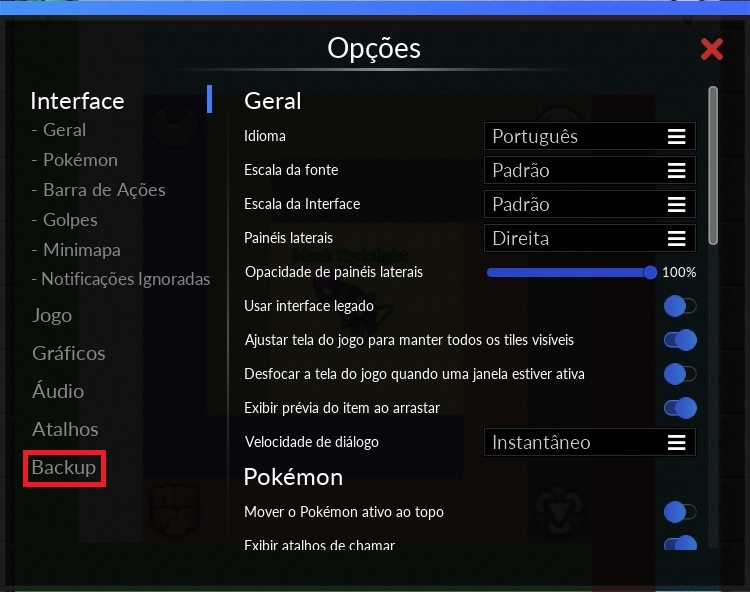
1. Navigate to Backup in the game settings.

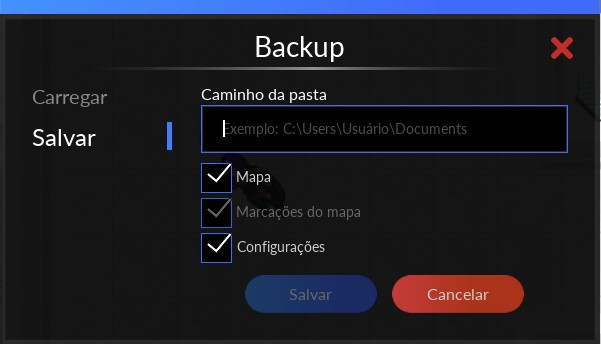
2. Click Save.
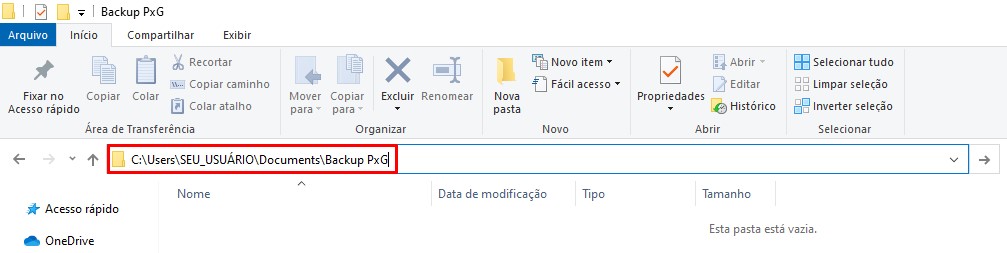
3. Designate a folder to save your backup and copy its location.
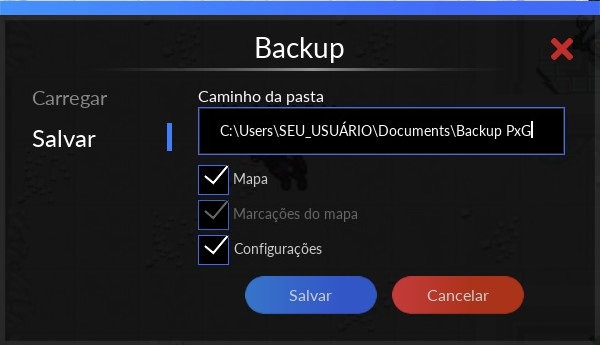
Note: This backup includes your action bars, hotkeys, and additional settings, so ensure all options are checked for a comprehensive backup.
Uninstallation
1. Navigate to your computer's taskbar and enter PokeXGames into the search box. Once the application appears, right-click on it and select the Uninstall option from the dropdown menu.
2. Locate the one specifically labeled as PokeXGames version 1.0. Right-click on this entry to initiate the uninstallation process.
Reinstallation
1. Download the latest launcher version from the official PokeXGames website.
2. Reinstall PokeXGames in a different directory.
⭐ Credit: Special thanks to CM Dabura for invaluable tutorial content.